

SoundCloud is full of music you won’t find anywhere else. Demo versions, remixes, DJ sets that only exist there and nowhere else. The problem is that the platform doesn’t always want you to save them locally, and the online services that claim to help you are about as reliable as a used car without a service history. There is a better alternative and it is built for Windows, free, open source, and requires zero programming skills to use. At the end of the article, you will find the tool to download. But read the text first to understand how everything fits together.
Table of content
Online services cannot be trusted
There are countless sites claiming to convert SoundCloud tracks to MP3 in no time. Click on one of these and you are met with layers of ads, dubious redirects, and files of uncertain quality from unknown sources. At best, you get a 128 kbps file that sounds like it was recorded through a blanket. At worst, you have downloaded something your antivirus software would like to have a serious talk with you about.
These services also violate SoundCloud’s terms of use and can be shut down overnight. Relying on something like that usually ends with unhappy supervision and a half-downloaded playlist.
The solution that is easy for everyone to use
The entire solution is built on top of yt-dlp, the same engine that powers the YouTube downloader described in a previous article. yt-dlp is a free command-line tool with open source code that runs locally on your computer, sends nothing to unclear servers, and gives full control over the result.
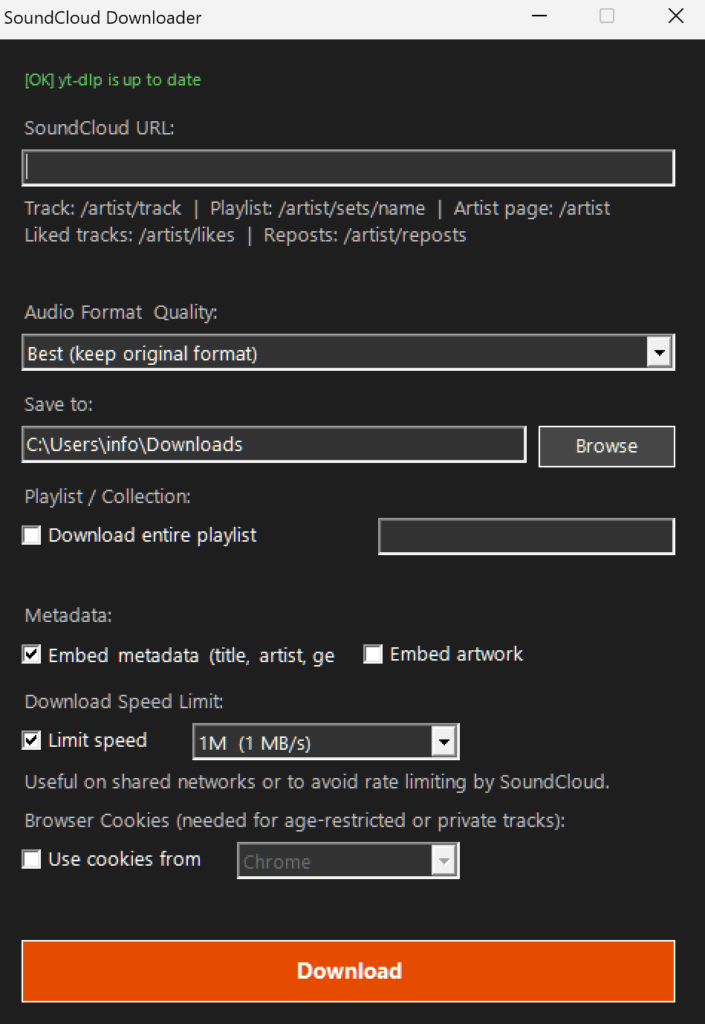
Around yt-dlp there is a custom-developed PowerShell script with a graphical window in Windows style. Paste a SoundCloud link, choose format, and click Download. That is the entire workflow. No commands to memorize, no terminal to stare at.
The files needed and how they are placed
The project consists of four files that must be in the same folder:
- Run SoundCloud downloader.bat starts the entire application with a double click
- soundcloud-dl-gui.ps1 is the PowerShell script itself with the graphical interface
- yt-dlp.exe is the download engine and is obtained separately from yt-dlp’s GitHub page
- ffmpeg.exe and ffprobe.exe handle audio processing and are required for conversion, merging HLS streams, and embedding album art
SoundCloud delivers most tracks as HLS streams, which is segmented audio in pieces that need to be stitched together into a complete file. That is exactly what ffmpeg does in the background without you noticing. Without ffmpeg, neither conversion to MP3 nor embedding cover images works.
What the tool recognizes automatically
A clever feature is that the tool analyzes the link in real time and immediately shows what has been detected below the URL field. If you paste a link to a single track, “Single track” is shown and the playlist checkbox is automatically unchecked. If it is a playlist, artist page, likes page, or reposts, the tool automatically selects the correct mode. Detected URL types are:
- Single tracks
- Playlists and sets
- Whole artist pages
- Liked tracks
- Reposts
Audio format and quality
In the quality menu, you choose from six options:
- Best keep original format downloads the file exactly as SoundCloud delivers it, without re-encoding, which is fastest and preserves the original quality
- MP3 320 kbps for high quality
- MP3 192 kbps for standard quality
- MP3 128 kbps for smaller file size
- FLAC for lossless audio
- OGG Vorbis as an open alternative
All formats except the first require ffmpeg.
Playlists and collections with optional interval
The checkbox for playlist is activated automatically based on the link type but can be adjusted manually. To the right of the checkbox there is a field to limit which tracks are downloaded:
- 1-10 downloads the first ten tracks
- 5-5 only downloads track number five
- Empty field downloads the entire collection
File names are set automatically and differ depending on the mode:
- Individual tracks are saved as Artist – Title.format
- Playlists and collections get a track index in front, for example 01 – Artist – Title.format
Speed limit against blocking
Just like with YouTube, SoundCloud registers when an IP address begins downloading at industry speed. The tool therefore has a built-in speed limit which is enabled by default at 1 MB per second. The options are 500K, 1M, 2M and 5M. If you uncheck the box, everything downloads at full speed, but the risk of temporary blocking increases.
Take it easy, download only what is actually needed and let it take the time it takes. It is not a race.
Cookies when SoundCloud requires login
Liked tracks and certain private content require you to be logged in to SoundCloud. The solution is cookies from a browser session. Check the box “Use cookies from” and choose browser, Chrome, Firefox, Edge, Brave, Opera or Vivaldi. One important detail: Chrome and Edge lock their cookie database while running and must be fully closed before clicking Download. Firefox does not need to be closed.
The warning that is actually worth taking seriously: if SoundCloud detects that a logged-in account is used for large-scale automated downloads, the account risks being banned. Use the cookies feature for occasions when the content actually requires login, not as a way to empty the entire platform over a weekend.
yt-dlp updates automatically every time it starts
A built-in function checks and updates yt-dlp automatically every time the tool is opened. The status is displayed at the top of the window immediately, green if everything is up to date and blue if a new version was just downloaded. This means downloads continue to work even when SoundCloud makes changes on their side, which otherwise often causes unexpected interruptions.
A reminder about copyright
yt-dlp is a tool and like all tools it can be used wisely or carelessly. Downloading material for personal offline use is one thing, especially music where the artist explicitly allows it. Sharing copyrighted material further is a completely different matter with legal consequences that are far more troublesome than a bad online service. Many artists on SoundCloud share their music freely, but it is important to check the license terms before assuming everything is freely available.