

Online services that promise easy downloading of YouTube videos deliver at best a mediocre file. At worst, they deliver malicious code and you get a lesson in naivety. There is a much better alternative, it is free and you don’t need to know a single programming language to use it. At the end of the article, there is also a Powershell script available for download. But read the text first to get a good understanding of how everything fits together.
Table of content
Avoid online services completely just do it
There are countless sites claiming to download YouTube videos for you. The problem is that most of these services are either slow, limited to low quality, full of ads, or in the worst case active threats to your computer. Many also collect data about you in the background while you click through their fifteen steps to access your video.
Online services also often violate YouTube’s terms of use, which means they can be shut down without warning. You become dependent on something that may not exist tomorrow. Not ideal.
The best solution is yt-dlp
yt-dlp is a free command line tool with open source code and an actively maintained further development of the older youtube-dl. It runs directly on your computer, nothing is sent to unclear servers in third countries and you have full control over what happens.
The tool not only works with YouTube but supports hundreds of platforms including Vimeo, Twitter and Twitch. The quality can be manually selected up to 4K if the source allows it. It is basically everything you could want from a download tool without fees and without drama.
The basic command is almost charmingly simple. Open the terminal and type:
yt-dlp https://www.youtube.com/watch?v=VIDEOID
That’s all. The video will be downloaded in the best available quality directly to the folder you are in. But it can be a bit tricky, so to create a truly great solution, here are 3 other parts that easily combine to give you a GUI that you can use again and again whenever you want to download videos from YouTube.
ffmpeg is an important puzzle piece
YouTube delivers video and audio as two separate streams. This is not a mistake but a conscious choice by Google. The consequence is that something needs to merge them into a complete file afterwards.
That is exactly what ffmpeg does. It is a powerful and free tool that handles the merging in the background without you noticing. Without ffmpeg, you would end up with either a video file without audio or an audio track without video. Not ideal if you want to watch something.
You download ffmpeg separately and place it in the same folder as yt-dlp. Then they handle the rest together automatically.
Node.js for hassle-free downloading
YouTube protects its video links with advanced JavaScript challenges that must be solved before a download can start. It involves encrypted signatures and so-called PO-tokens that YouTube requires to verify that a request is legitimate.
Previously yt-dlp could handle this with a built-in simplified JavaScript interpreter written in Python, but due to changes on YouTube’s side, it is no longer sufficient. The solutions have become too complex to interpret without a proper JavaScript environment.
Without a JavaScript environment installed, support for YouTube is now officially deprioritized, which means limited access to formats and in some cases no downloads at all. Node.js is the environment that solves this on Windows and that is exactly why it is included as one of the components in the solution.
Combine everything into one PowerShell script with GUI
Example of what it looks like with a homemade PowerShell script
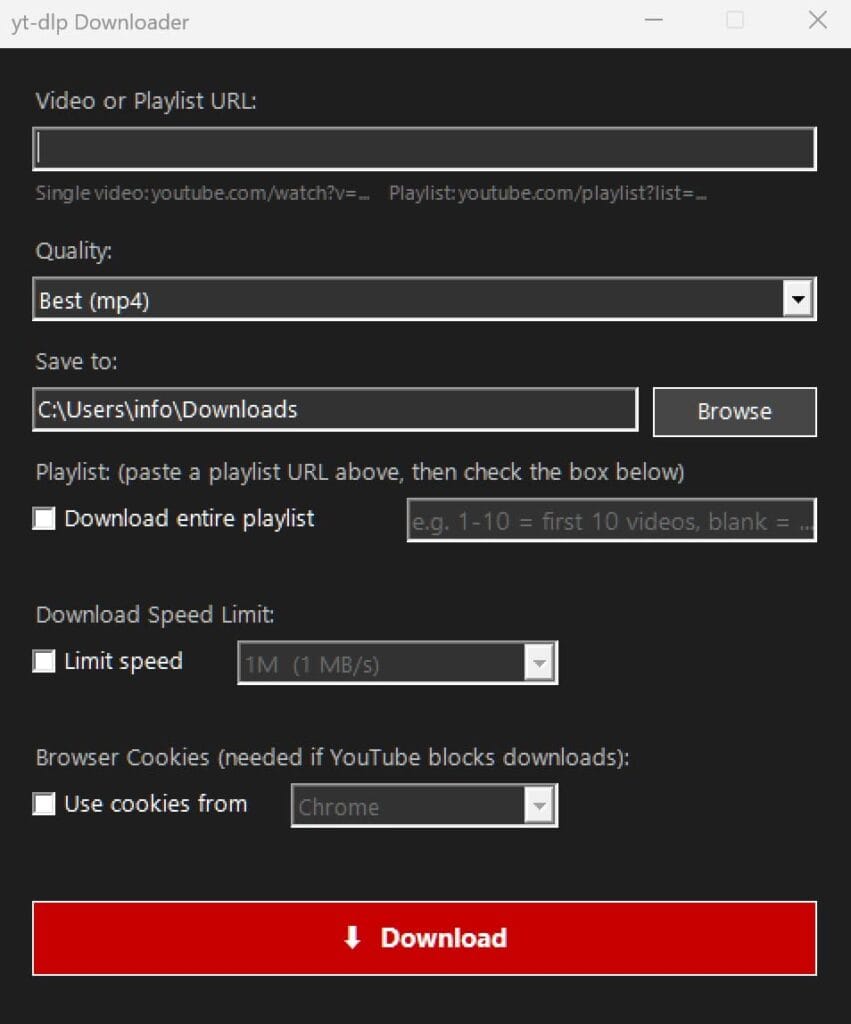
The terminal is perfect for those comfortable with command lines but for everyone else it can feel as inviting as a tax return in English. This is where the PowerShell script comes in.
With a PowerShell script, a graphical window is created in Windows where you just paste a YouTube link, select quality, and press a button. No commands to memorize, no terminal to stare at. The script calls yt-dlp and ffmpeg in the background and does the heavy lifting without the user needing to see or understand a single command.
The quality options include everything from the best available mp4 and 1080p down to 360p as well as audio only in MP3. All video files are saved as mp4 with AAC audio which works directly in Windows without needing to install extra codecs. If you want to download a whole playlist, you check a box and can also specify a range to fetch only a selection of videos.
The three files, yt-dlp, ffmpeg, and the PowerShell script, are placed in the same folder and then work together as a complete downloading tool with a proper Windows interface. Simple, and without complications.
You will get blocked by Youtube but it can be resolved
Here comes an important disclaimer that many learn the hard way. YouTube registers when an IP address starts downloading videos at an industrial pace. If you download too many videos in a short time, YouTube begins to limit the connection or block it completely.
The GUI has a built-in feature to handle this with a speed limiter that can be set anywhere from 500K up to 5M per second. It may sound like a limitation but it is actually a smart way to stay under YouTube’s radar and avoid triggering their automatic protection systems.
Take it easy, download only what is actually needed and let it take the time it takes. This is not a race.
Cookies as a solution if you get blocked but with a risk
Sometimes an error message appears that roughly says “Sign in to confirm you’re not a bot.” This is YouTube’s way of showing that they have become suspicious. The solution is to use cookies from a logged-in web browser session.
In the GUI, you check the box for cookies and select the browser where you are logged into YouTube, for example Chrome, Firefox or Edge. One important detail: Chrome and Edge lock their cookie database while running and must be completely closed before you click Download. Firefox does not need to be closed.
But here is the warning that is actually worth taking seriously. If YouTube detects that a logged-in account is used for automated downloads on a large scale the account can be banned. Permanently. You do not want to lose your account with years of history, subscriptions and saved content.
The advice is simple do not be greedy. The cookies feature is a tool for situations when the download is actually blocked by YouTube, not a way to download the entire platform’s video archive over a weekend.
Keep yt-dlp updated
YouTube regularly updates its systems which can cause downloads to suddenly fail without warning. The solution is almost always to update yt-dlp to the latest version. This is easily done with:
.\yt-dlp.exe -U
Alternatively, you can download a new yt-dlp.exe from GitHub and replace the old one. A small but important routine that saves a lot of frustration.
An important reminder about copyright
yt-dlp is a tool and like all tools it can be used wisely or carelessly. Downloading material for personal offline use is one thing. Sharing copyrighted content further is a completely different matter with legal consequences that are far more troublesome than a few pop-up ads. Common sense is highly recommended.
Sources
https://github.com/yt-dlp/yt-dlp